> ## Documentation Index
> Fetch the complete documentation index at: https://docs.docwriter.org/llms.txt
> Use this file to discover all available pages before exploring further.
# Comments
> When the agent leaves margin feedback instead of editing, and how to respond.
The agent uses comments when its feedback is open-ended or uncertain.
"I'm not sure this paragraph lands — want to take another pass?", "is
this still the right framing after the changes above?", "this claim
could use a citation but I couldn't find a clean source." Anything
that's a question or a soft suggestion rather than a concrete change
shows up as a comment thread in the margin, not as a pending edit.
## Where comments appear
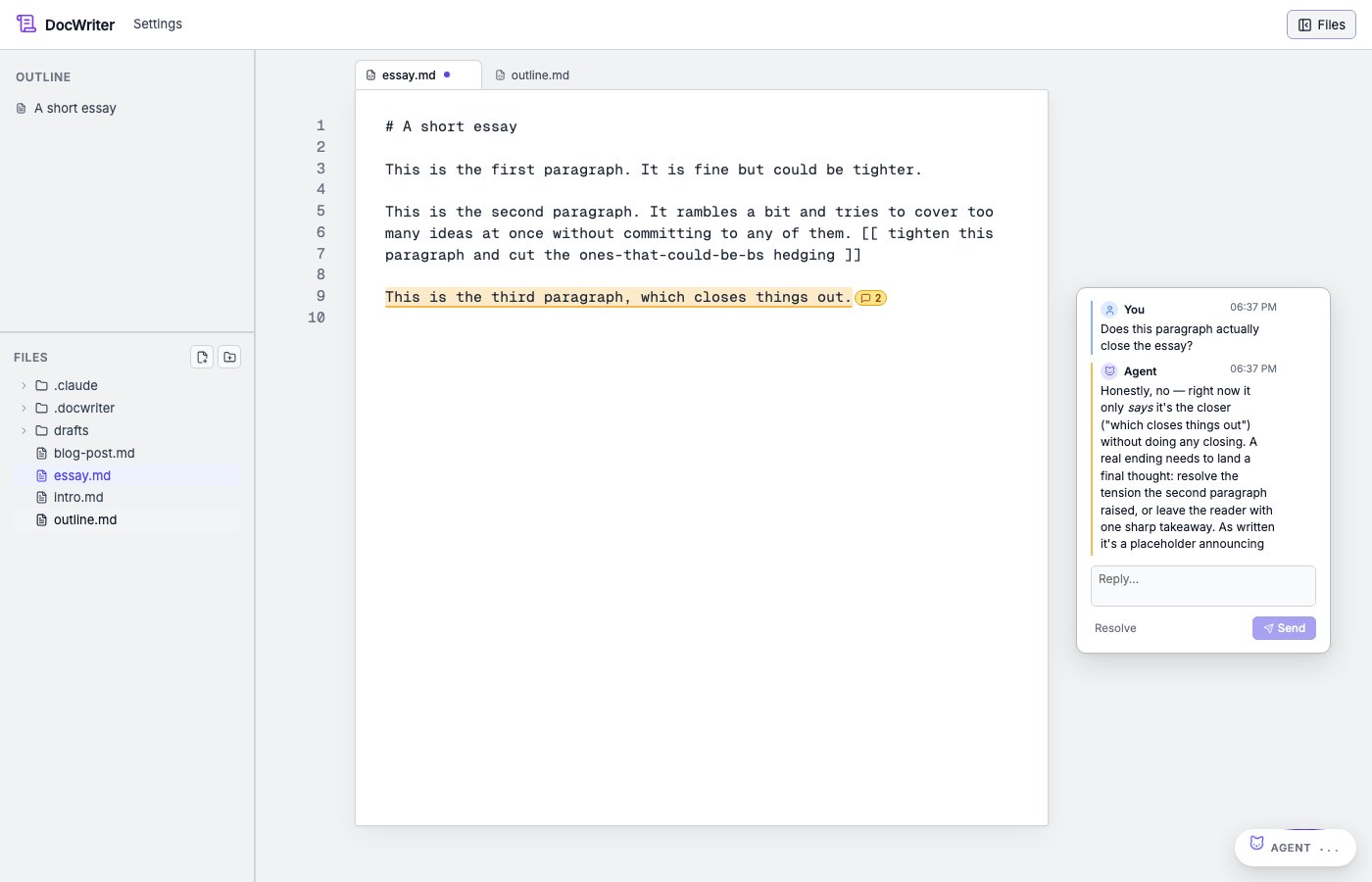
Each comment is anchored to a passage in the document. A small
indicator sits next to the anchored text; clicking it (or clicking the
comment in the outline pane) expands the thread inline. The thread
shows every message in order — the agent's original comment, your
replies, any subsequent agent messages.
 Comment threads are persistent. They survive reloads, sessions, and
git commits (the threads live in `.docwriter/docwriter.db`, not in
your tab files).
When you run a [critique pass](/agent/steering-the-agent#running-a-critique-pass),
the reviewer leaves each finding as a comment on the relevant passage.
You see the reviewer's name, mascot, and color on the comment. You can
reply to or resolve the comment like any other thread.
## What you can do with a thread
**Reply** by typing in the thread input and submitting. The reply
becomes another message in the conversation, and the agent picks it up
on the next turn.
**Approve & propose edit.** When the agent's comment carries a
proposed edit (the SDK's `proposed_edit` field on `post_comment`), the
thread shows an "Approve & propose edit" button. Clicking it tells
the agent to apply the suggested change as an actual edit\_doc on the
next turn — the comment becomes a pending review you can accept or
reject like any other edit.
**Resolve** the thread when you're done with it. Resolved threads
collapse out of the way but stay in the database; you can reopen
them later.
## When the anchored text changes
You can edit a passage without losing its comment thread. When you type
inside the passage, you see the highlighted range expand. The highlighted
range is unchanged when you edit text elsewhere.
When you remove the passage, e.g. by accepting an agent edit that rewrites
it, you no longer see the thread card in the margin. The thread is still
saved. If you undo the edit, you see the passage and the card again.
If you later type the same words elsewhere, the hidden card is not shown
again. A thread is attached to one passage rather than to every copy of
the same text, so you do not see old feedback on unrelated text.
## When you'd cause a comment instead of an edit
A comment thread is created when:
1. **The agent decides.** During an auto-wake or chat-popover turn,
the agent reads the open files and chooses to comment when its
feedback doesn't translate to a concrete edit — a question, a
maybe, an observation that needs your input. The autonomy level
biases this choice (conservative is more comment-happy;
aggressive prefers to just make the edit).
2. **You give feedback on a passage.** When you use
[the feedback popup](/agent/feedback-popup), you start a thread on
the selected passage. The agent responds on the thread. With
**Plan first** on, the agent explains its reasoning before it proposes
an edit.
3. **The agent proposes an edit.** Before the agent proposes an edit,
it starts a thread. The agent explains what it will change, and you
can read the explanation next to the edit in the margin.
4. **You run a critique pass.** The reviewer reads the active file and
leaves up to six findings. When a small change can fix a problem, the
reviewer may propose an edit on the same thread.
## When to reply vs. when to approve
If the agent's comment is a question, reply. If it's a suggestion you
agree with, approve the proposed edit (if present) or reply with "go
ahead and apply that" and the agent will do so next turn.
Comments aren't a chat. Keep replies short — a sentence or two.
They're for one decision at a time, not extended discussion.
Comment threads are persistent. They survive reloads, sessions, and
git commits (the threads live in `.docwriter/docwriter.db`, not in
your tab files).
When you run a [critique pass](/agent/steering-the-agent#running-a-critique-pass),
the reviewer leaves each finding as a comment on the relevant passage.
You see the reviewer's name, mascot, and color on the comment. You can
reply to or resolve the comment like any other thread.
## What you can do with a thread
**Reply** by typing in the thread input and submitting. The reply
becomes another message in the conversation, and the agent picks it up
on the next turn.
**Approve & propose edit.** When the agent's comment carries a
proposed edit (the SDK's `proposed_edit` field on `post_comment`), the
thread shows an "Approve & propose edit" button. Clicking it tells
the agent to apply the suggested change as an actual edit\_doc on the
next turn — the comment becomes a pending review you can accept or
reject like any other edit.
**Resolve** the thread when you're done with it. Resolved threads
collapse out of the way but stay in the database; you can reopen
them later.
## When the anchored text changes
You can edit a passage without losing its comment thread. When you type
inside the passage, you see the highlighted range expand. The highlighted
range is unchanged when you edit text elsewhere.
When you remove the passage, e.g. by accepting an agent edit that rewrites
it, you no longer see the thread card in the margin. The thread is still
saved. If you undo the edit, you see the passage and the card again.
If you later type the same words elsewhere, the hidden card is not shown
again. A thread is attached to one passage rather than to every copy of
the same text, so you do not see old feedback on unrelated text.
## When you'd cause a comment instead of an edit
A comment thread is created when:
1. **The agent decides.** During an auto-wake or chat-popover turn,
the agent reads the open files and chooses to comment when its
feedback doesn't translate to a concrete edit — a question, a
maybe, an observation that needs your input. The autonomy level
biases this choice (conservative is more comment-happy;
aggressive prefers to just make the edit).
2. **You give feedback on a passage.** When you use
[the feedback popup](/agent/feedback-popup), you start a thread on
the selected passage. The agent responds on the thread. With
**Plan first** on, the agent explains its reasoning before it proposes
an edit.
3. **The agent proposes an edit.** Before the agent proposes an edit,
it starts a thread. The agent explains what it will change, and you
can read the explanation next to the edit in the margin.
4. **You run a critique pass.** The reviewer reads the active file and
leaves up to six findings. When a small change can fix a problem, the
reviewer may propose an edit on the same thread.
## When to reply vs. when to approve
If the agent's comment is a question, reply. If it's a suggestion you
agree with, approve the proposed edit (if present) or reply with "go
ahead and apply that" and the agent will do so next turn.
Comments aren't a chat. Keep replies short — a sentence or two.
They're for one decision at a time, not extended discussion.