> ## Documentation Index
> Fetch the complete documentation index at: https://docs.docwriter.org/llms.txt
> Use this file to discover all available pages before exploring further.
# Review edits
> Accept, reject, inspect, and undo proposed changes.
## Read a proposal
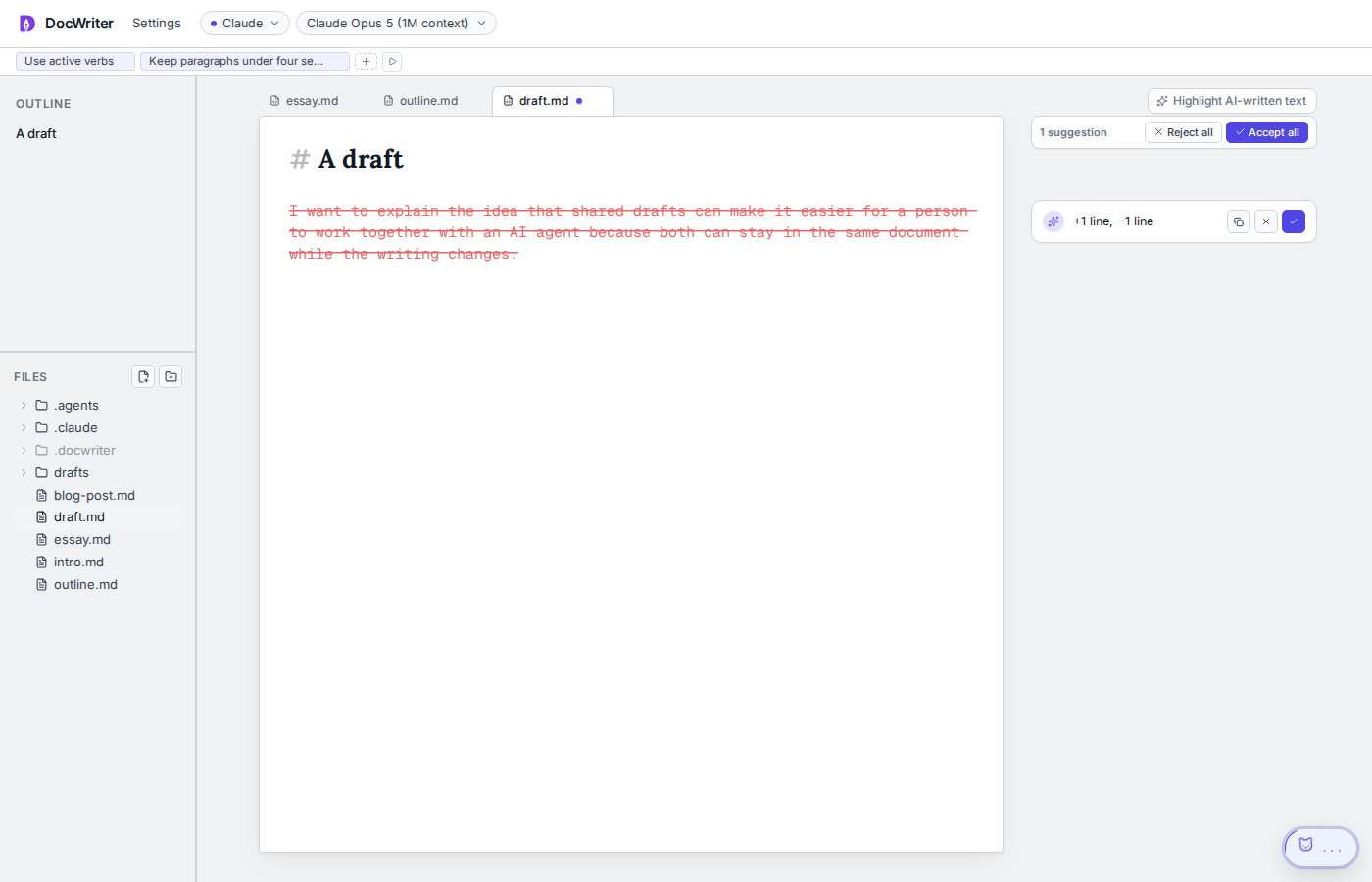
Proposed text appears in the editor and in a card in the comment gutter. Green text is an addition and red struck text is a removal.
Hover an edit row to flash the matching text. Pin a diff to keep the proposal visible after closing a card. Small edits use a quieter presentation than large edits.
## Accept or reject
Use the check button to accept an edit or the x button to reject a loose edit. **Accept all** and **Reject all** act on the current tab.
Thread edits stay grouped under the comment that led to them. You can accept each grouped edit or accept the group.
An edit becomes stale when the source text no longer matches. DocWriter disables the Accept action. If the server detects stale source text during an Accept request, DocWriter rejects the old proposal and sends a follow up request for a new edit against the current text. There is no separate Regenerate button.
## Copy proposed text
Use **Copy proposed text** on an edit row. You can also select visible added text in the editor and copy it normally.
## AI provenance
Accepted agent text receives an AI provenance mark. Use **Highlight AI-written text** to show or hide the marks. Typing your own replacement inside a marked span removes the mark from the text you add.
## Undo
Accept and reject actions use the same user undo manager as local typing. Press **Command or Control and Z** to undo the latest user action.
After an accepted paragraph edit lands, DocWriter briefly flashes the changed range so you can find it in the draft.
Agent edits do not have a Track changes off setting. Muting hides proposal layers, but it does not accept changes or remove review state.
 ## Accept or reject
Use the check button to accept an edit or the x button to reject a loose edit. **Accept all** and **Reject all** act on the current tab.
## Accept or reject
Use the check button to accept an edit or the x button to reject a loose edit. **Accept all** and **Reject all** act on the current tab.
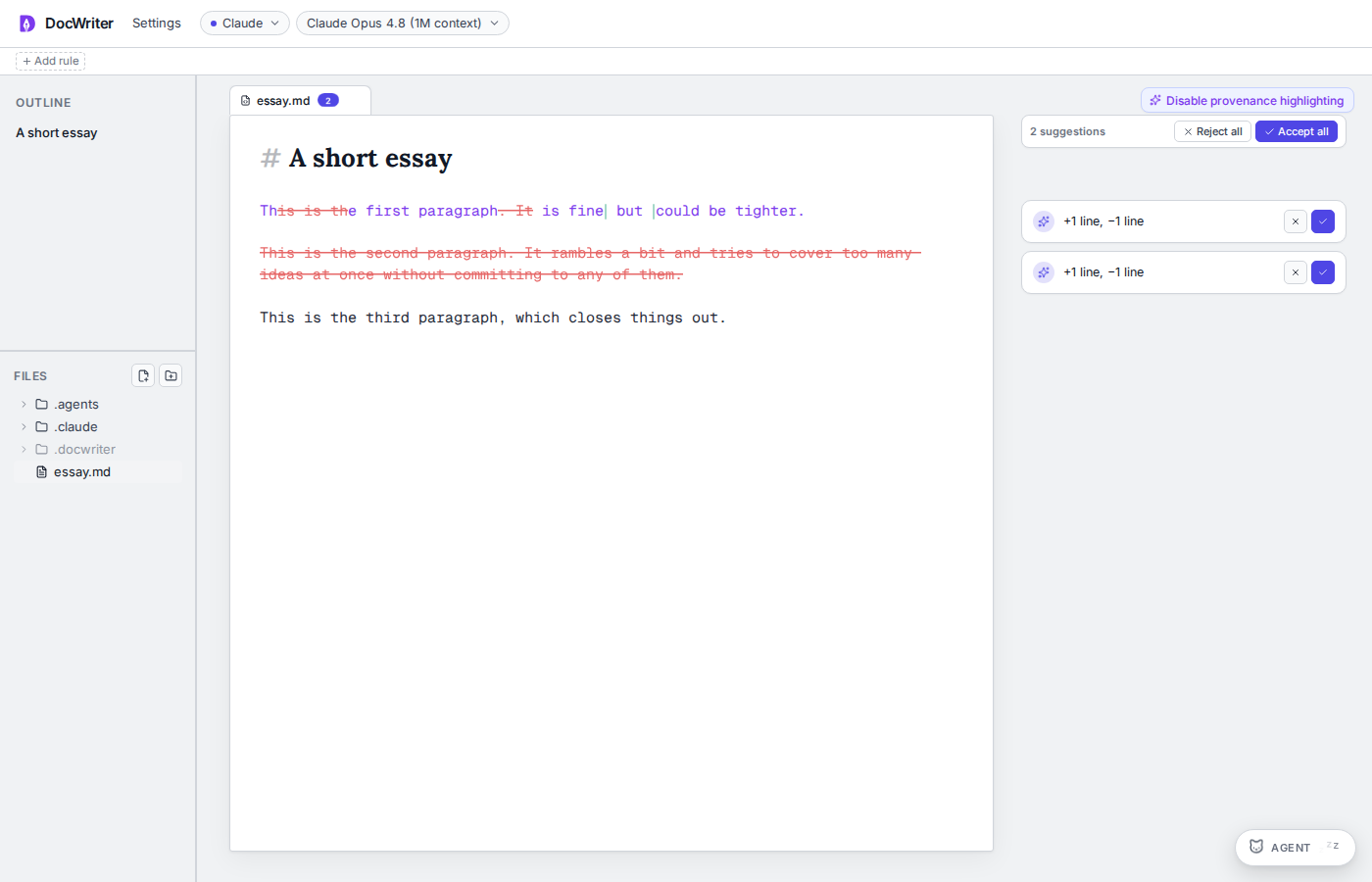 Thread edits stay grouped under the comment that led to them. You can accept each grouped edit or accept the group.
An edit becomes stale when the source text no longer matches. DocWriter disables the Accept action. If the server detects stale source text during an Accept request, DocWriter rejects the old proposal and sends a follow up request for a new edit against the current text. There is no separate Regenerate button.
## Copy proposed text
Use **Copy proposed text** on an edit row. You can also select visible added text in the editor and copy it normally.
## AI provenance
Accepted agent text receives an AI provenance mark. Use **Highlight AI-written text** to show or hide the marks. Typing your own replacement inside a marked span removes the mark from the text you add.
## Undo
Accept and reject actions use the same user undo manager as local typing. Press **Command or Control and Z** to undo the latest user action.
After an accepted paragraph edit lands, DocWriter briefly flashes the changed range so you can find it in the draft.
Agent edits do not have a Track changes off setting. Muting hides proposal layers, but it does not accept changes or remove review state.
Thread edits stay grouped under the comment that led to them. You can accept each grouped edit or accept the group.
An edit becomes stale when the source text no longer matches. DocWriter disables the Accept action. If the server detects stale source text during an Accept request, DocWriter rejects the old proposal and sends a follow up request for a new edit against the current text. There is no separate Regenerate button.
## Copy proposed text
Use **Copy proposed text** on an edit row. You can also select visible added text in the editor and copy it normally.
## AI provenance
Accepted agent text receives an AI provenance mark. Use **Highlight AI-written text** to show or hide the marks. Typing your own replacement inside a marked span removes the mark from the text you add.
## Undo
Accept and reject actions use the same user undo manager as local typing. Press **Command or Control and Z** to undo the latest user action.
After an accepted paragraph edit lands, DocWriter briefly flashes the changed range so you can find it in the draft.
Agent edits do not have a Track changes off setting. Muting hides proposal layers, but it does not accept changes or remove review state.