> ## Documentation Index
> Fetch the complete documentation index at: https://docs.docwriter.org/llms.txt
> Use this file to discover all available pages before exploring further.
# Reviewing edits
> Accept and reject agent edits, work with multiple pending rounds, and use undo.
When the agent edits a file, the change appears as a **pending review**
rather than landing directly. You accept or reject from the outline pane.
## The pending review card
A card appears in the outline pane (lower-left) titled "Pending edit". It
shows:
* The file the edit applies to (only relevant when several tabs have
pending edits).
* A short summary of the change.
* **Accept** and **Reject** buttons.
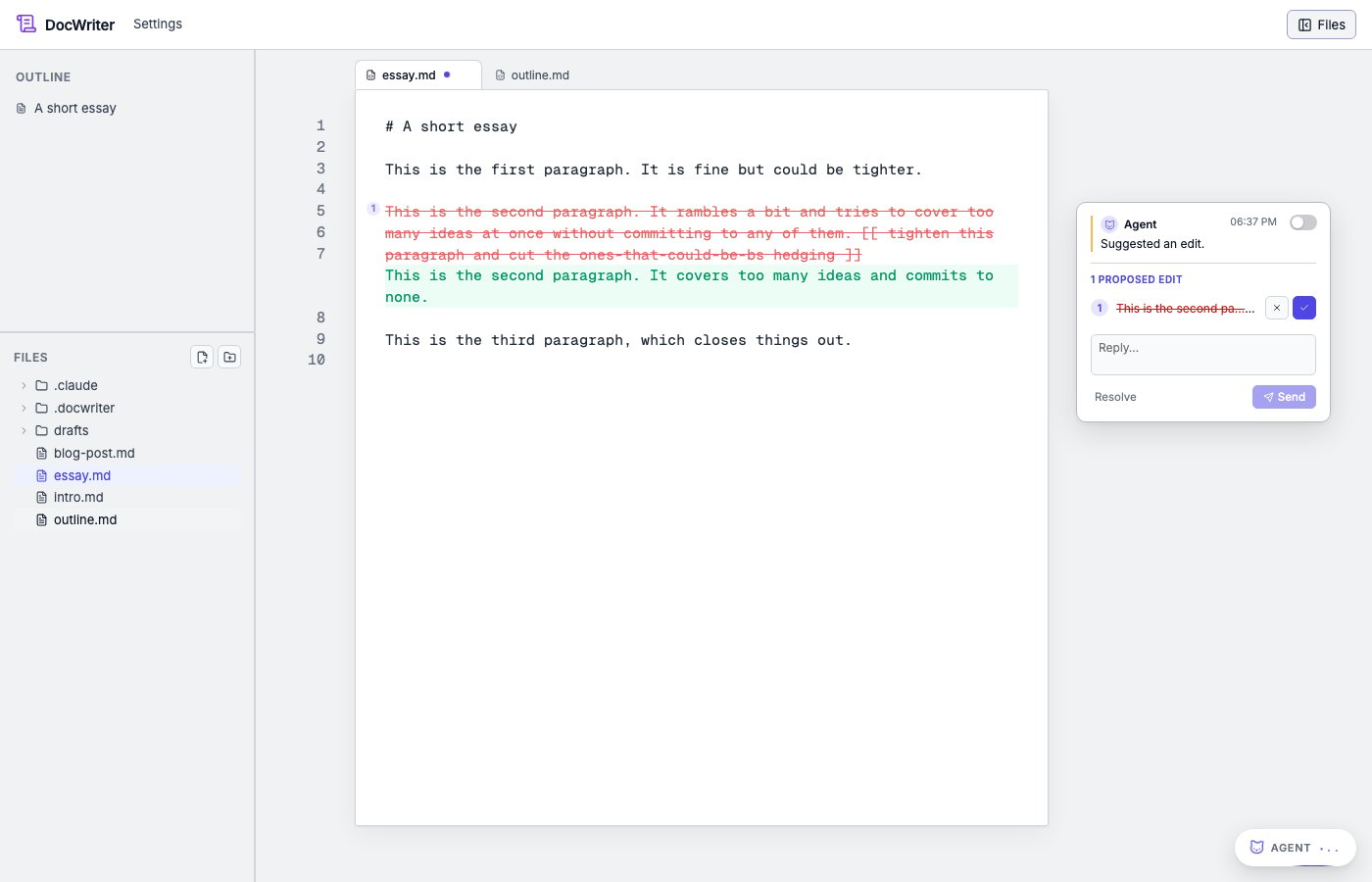
In the editor itself, the affected region is highlighted in the
track-changes style: new text in green, removed text struck through in
red.
 ## Accept
Click **Accept**. The highlight clears and the new text becomes part of
the document. Any hooks that match the `Edit`/`Write` tool name fire (see
[Hooks](/automation/hooks)). This is how a "rebuild PDF on every edit"
hook reacts to your accepting an agent change.
Accept is undoable. `Cmd/Ctrl+Z` reverts the accepted edit. Because agent
edits and your own typing are tagged with different origins, undoing an
accepted edit does not affect any unrelated typing you did at the same
time.
## Reject
Click **Reject**. The highlight clears and the document returns to its
pre-edit state.
Reject is local-first: it does not need a server round trip. The outline
card disappears immediately. If you reject by mistake, `Cmd/Ctrl+Z`
restores the pending review.
## Multiple pending rounds
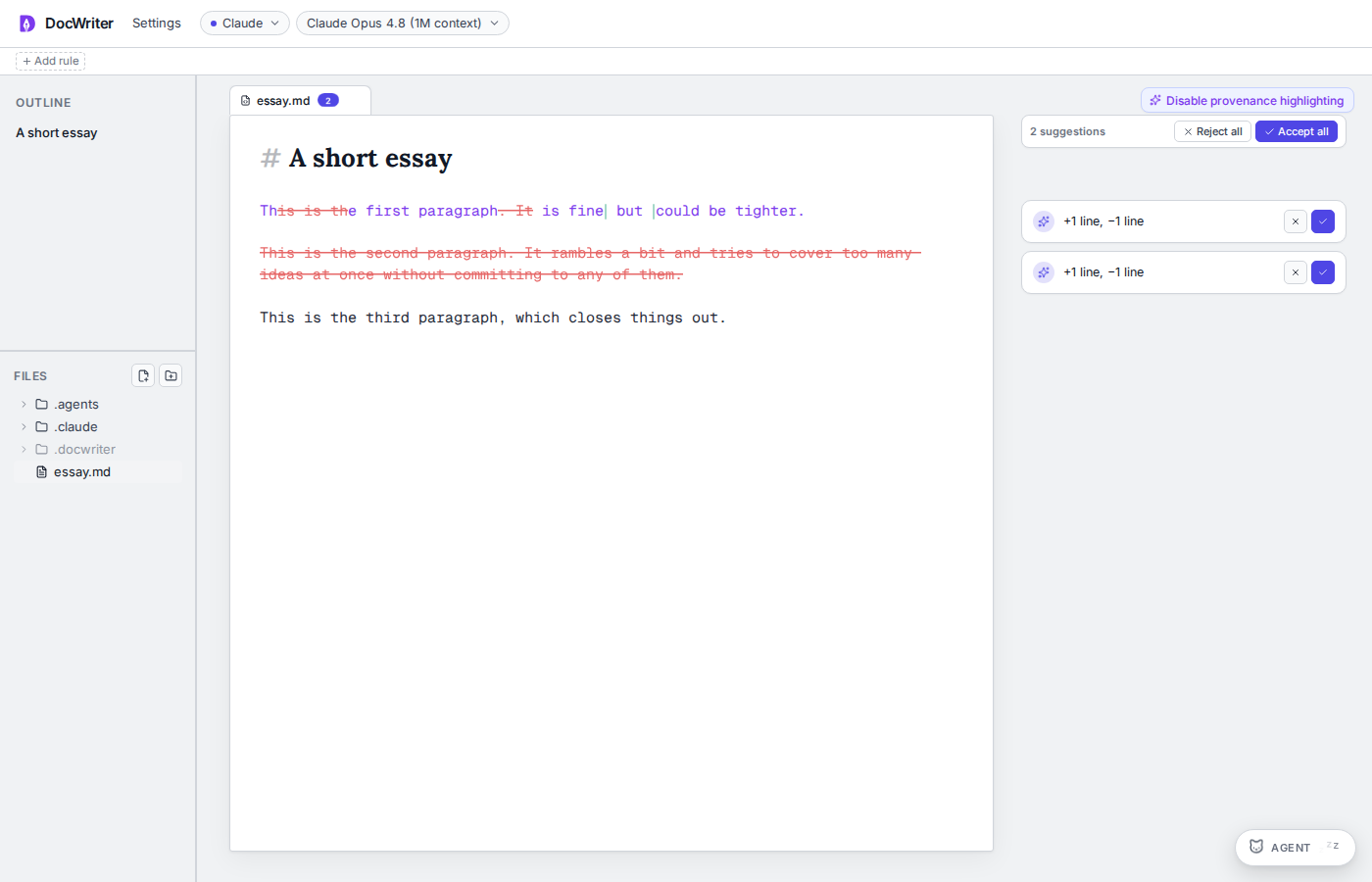
The agent can produce several edits in a single turn (for example, when
asked to "tighten every section"). Each becomes its own card in the
comment gutter and its own highlight in the document.
Each card has its own Accept and Reject controls. When the active tab has
any pending suggestions, the comment gutter shows an **Accept all** /
**Reject all** bar at the top so you can clear the whole stack in one
click.
A reviewer may propose a small edit during a [critique
pass](/agent/steering-the-agent#running-a-critique-pass). You see the
reviewer's name, mascot, and color on the edit card. You accept or
reject the edit through the same controls as any other agent edit.
## Accept
Click **Accept**. The highlight clears and the new text becomes part of
the document. Any hooks that match the `Edit`/`Write` tool name fire (see
[Hooks](/automation/hooks)). This is how a "rebuild PDF on every edit"
hook reacts to your accepting an agent change.
Accept is undoable. `Cmd/Ctrl+Z` reverts the accepted edit. Because agent
edits and your own typing are tagged with different origins, undoing an
accepted edit does not affect any unrelated typing you did at the same
time.
## Reject
Click **Reject**. The highlight clears and the document returns to its
pre-edit state.
Reject is local-first: it does not need a server round trip. The outline
card disappears immediately. If you reject by mistake, `Cmd/Ctrl+Z`
restores the pending review.
## Multiple pending rounds
The agent can produce several edits in a single turn (for example, when
asked to "tighten every section"). Each becomes its own card in the
comment gutter and its own highlight in the document.
Each card has its own Accept and Reject controls. When the active tab has
any pending suggestions, the comment gutter shows an **Accept all** /
**Reject all** bar at the top so you can clear the whole stack in one
click.
A reviewer may propose a small edit during a [critique
pass](/agent/steering-the-agent#running-a-critique-pass). You see the
reviewer's name, mascot, and color on the edit card. You accept or
reject the edit through the same controls as any other agent edit.
 ## Copying proposed text
You can copy text from a proposal without accepting the edit. Drag
across the green text and press `Cmd/Ctrl+C`, or hover over a proposed
line and use its copy button. You can also use the copy button on each
edit row in the thread. Copy the text when you want to use only part
of the proposal.
## Seeing which text the agent wrote
Click **Highlight AI-written text** in the top right of the editor to
see which words came from accepted agent edits. You see only the words
that the agent added, while your unchanged words are not marked.
When you type over a marked word, the word is no longer marked. Turning
the highlighting on or off does not change the document. You keep the
same highlighting choice after you reload the page.
## Typing while a review is open
You can type normally while a pending review is open. Your edits and the
agent's pending edit do not conflict. They merge through the editor's
collaborative data model. When you accept the agent edit, your concurrent
typing is preserved.
If your typing happens to land inside a region the agent is editing, the
visual highlight may shift slightly so both sets of changes remain
visible.
## Track changes off
If you turn off **Track changes** in the Agent behavior panel (under
Settings; see [Steering the agent](/agent/steering-the-agent)), agent
edits land
directly in the document with no pending review step. Undo still works to
revert them, and they are still grouped in the undo stack as
agent-origin (separate from your own typing).
Use this when you want the agent to operate more like a quick autocomplete
than a reviewer.
## Where to go next
* [Steering the agent](/agent/steering-the-agent). Prompts, model
selection, autonomy.
* [Comments](/agent/comments). When the agent leaves feedback in the
margin instead of proposing an edit.
* [Hooks](/automation/hooks). What fires when you accept an edit.
## Copying proposed text
You can copy text from a proposal without accepting the edit. Drag
across the green text and press `Cmd/Ctrl+C`, or hover over a proposed
line and use its copy button. You can also use the copy button on each
edit row in the thread. Copy the text when you want to use only part
of the proposal.
## Seeing which text the agent wrote
Click **Highlight AI-written text** in the top right of the editor to
see which words came from accepted agent edits. You see only the words
that the agent added, while your unchanged words are not marked.
When you type over a marked word, the word is no longer marked. Turning
the highlighting on or off does not change the document. You keep the
same highlighting choice after you reload the page.
## Typing while a review is open
You can type normally while a pending review is open. Your edits and the
agent's pending edit do not conflict. They merge through the editor's
collaborative data model. When you accept the agent edit, your concurrent
typing is preserved.
If your typing happens to land inside a region the agent is editing, the
visual highlight may shift slightly so both sets of changes remain
visible.
## Track changes off
If you turn off **Track changes** in the Agent behavior panel (under
Settings; see [Steering the agent](/agent/steering-the-agent)), agent
edits land
directly in the document with no pending review step. Undo still works to
revert them, and they are still grouped in the undo stack as
agent-origin (separate from your own typing).
Use this when you want the agent to operate more like a quick autocomplete
than a reviewer.
## Where to go next
* [Steering the agent](/agent/steering-the-agent). Prompts, model
selection, autonomy.
* [Comments](/agent/comments). When the agent leaves feedback in the
margin instead of proposing an edit.
* [Hooks](/automation/hooks). What fires when you accept an edit.