> ## Documentation Index
> Fetch the complete documentation index at: https://docs.docwriter.org/llms.txt
> Use this file to discover all available pages before exploring further.
# Writing rules
> Persistent style preferences and instructions the agent follows.
A **writing rule** is a short, persistent instruction the agent applies
to every turn. Rules live alongside the workspace in `.docwriter/` and
get injected into the agent's prompt automatically.
## Adding a rule
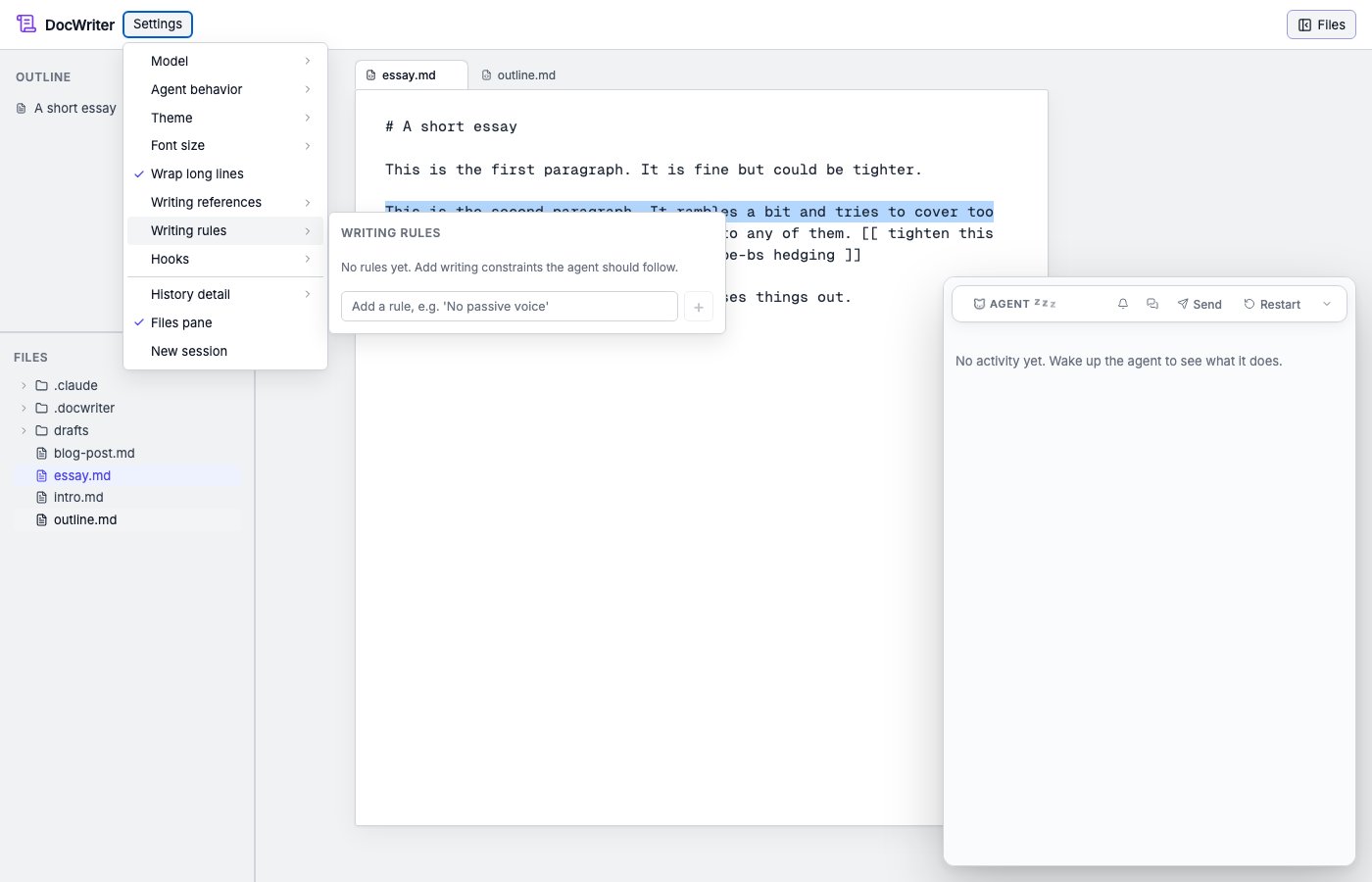
In the menu bar, open **Settings** and click **Writing rules**. A panel
opens listing every rule in the workspace. Type a new rule into the
input at the bottom and press Enter.
 ## Examples
* "Avoid passive voice."
* "Use footnotes for parenthetical asides, not em dashes."
* "Headings use sentence case, not title case."
* "When citing a paper, use APA format."
* "Never start a sentence with 'Furthermore' or 'Moreover.'"
Rules are most useful when they're short, specific, and apply broadly
across your writing. A rule like "rewrite paragraph 3" doesn't belong as
a rule (use an [inline directive](/agent/inline-directives) for that
instead).
## Agent-proposed rules
The agent can also propose rules. If you mention a preference
incidentally ("I always want footnotes for sources"), the agent may
suggest making it a rule. A proposal card appears in the outline pane on
the left; accept to save the rule, reject to dismiss.
This routes through the `propose_rule` MCP tool. See [How it
works](/reference/how-it-works) for the architectural details if you're
curious.
## Violation examples
You can give the agent a violation example for each rule. The agent
compares new prose with each example, so it does not have to infer your
meaning from abstract wording.
To add an example yourself, click **+ example violation** under the rule
and paste the passage that broke it. Use the remove control next to an
example when you no longer need it.
The agent can also propose an example. When you reject an edit with
feedback, the agent may propose a rule based on your feedback. If you
accept the rule, the agent saves the original passage as its first
example. For example, the rule "Never hedge with 'quite', 'rather', or
'somewhat'" can include the sentence that led you to write the rule.
## Freezing a passage
To stop the agent from editing a specific paragraph (or any selection),
highlight the text and click **Freeze for agent** in the feedback popup.
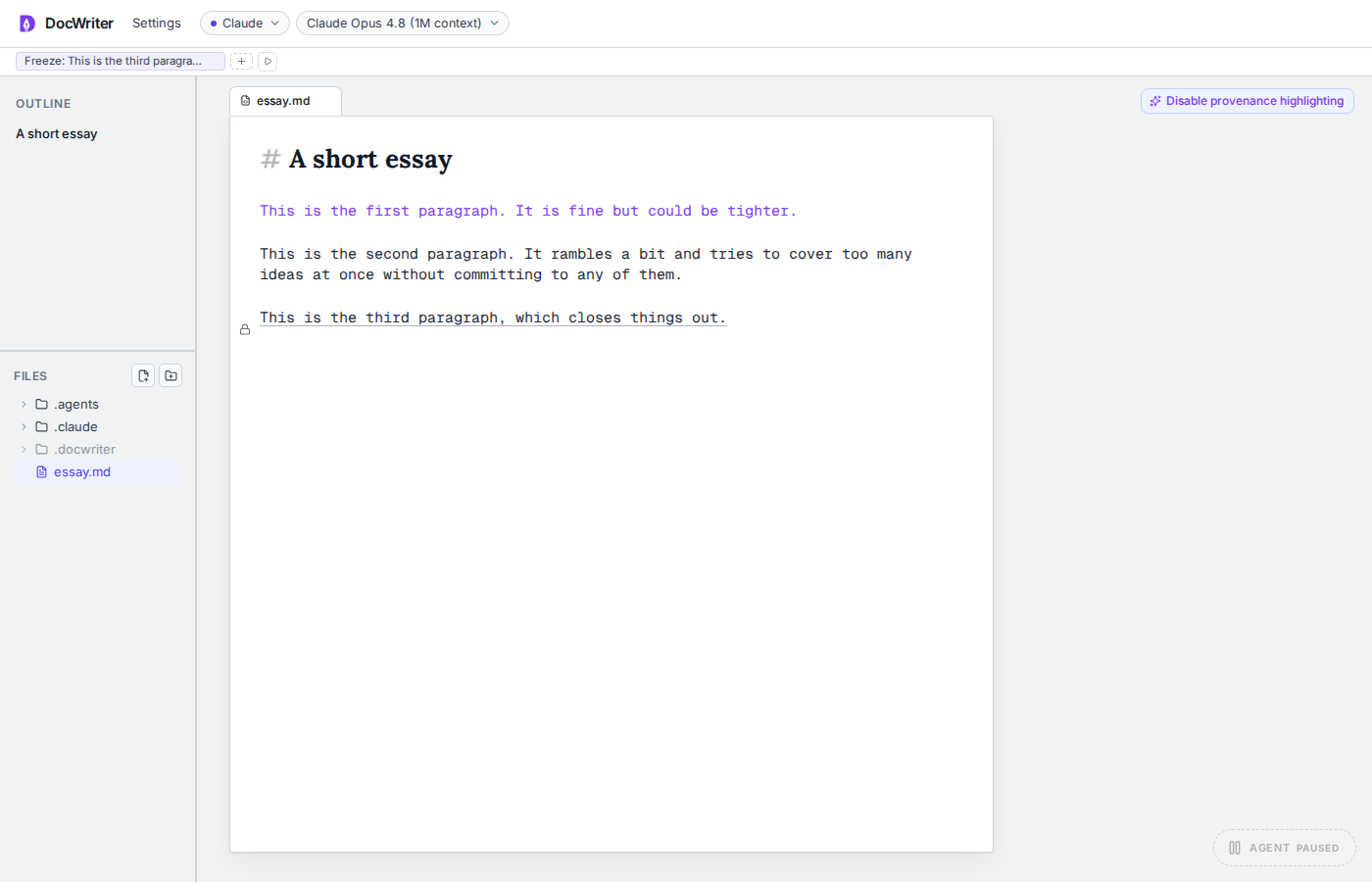
That stores a `Freeze: …` rule, underlines the passage, and places a
lock icon in the left margin (text stays flush). The agent's `edit_doc`
tool rejects edits that overlap the frozen quote. Locking also wakes the
agent with a message so it knows the passage is off-limits.
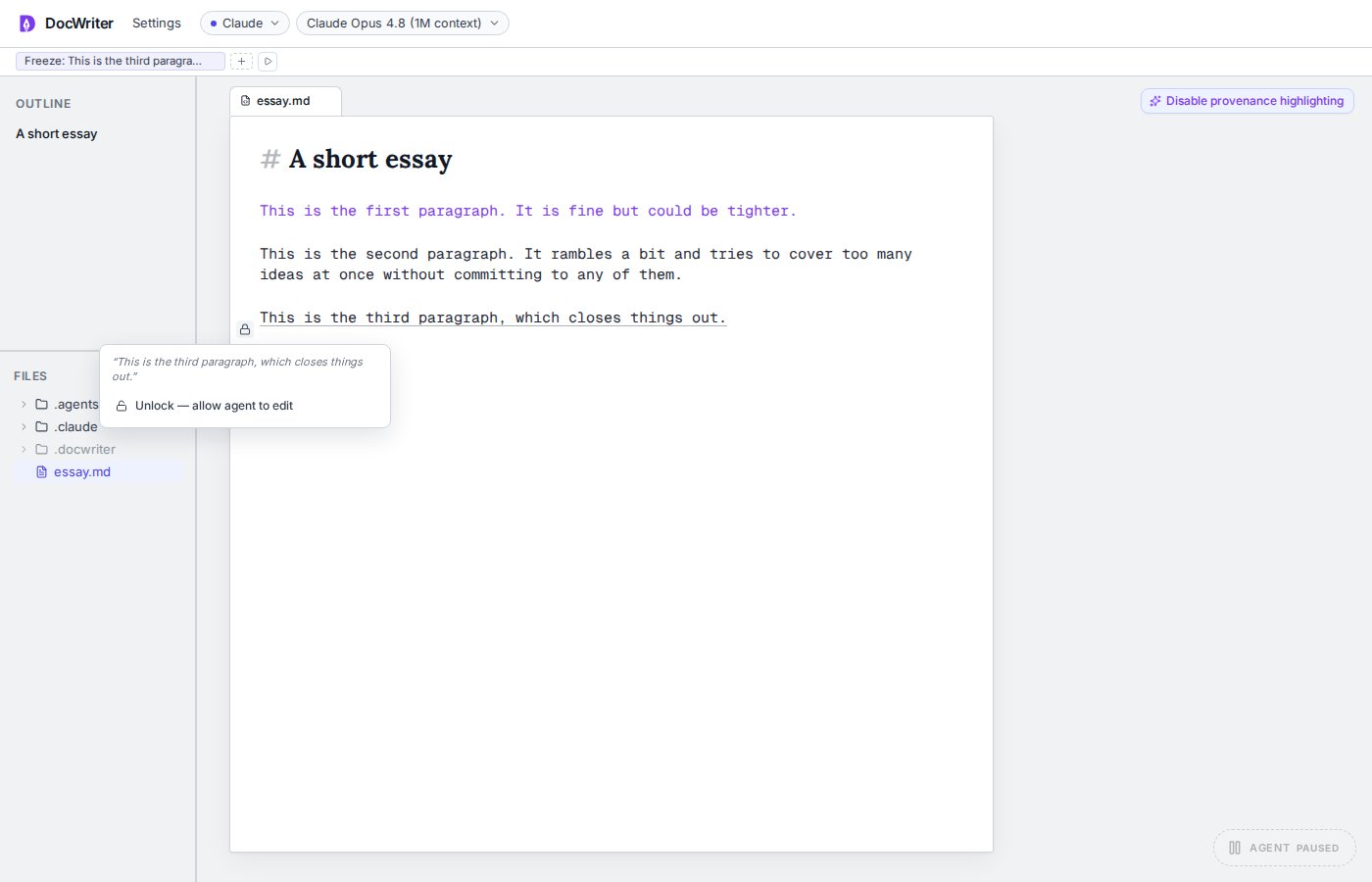
Click the lock to open an **Unlock — allow agent to edit** menu (or
remove the freeze rule in Writing rules). Unlocking persists the rule
change and wakes the agent again.
## Examples
* "Avoid passive voice."
* "Use footnotes for parenthetical asides, not em dashes."
* "Headings use sentence case, not title case."
* "When citing a paper, use APA format."
* "Never start a sentence with 'Furthermore' or 'Moreover.'"
Rules are most useful when they're short, specific, and apply broadly
across your writing. A rule like "rewrite paragraph 3" doesn't belong as
a rule (use an [inline directive](/agent/inline-directives) for that
instead).
## Agent-proposed rules
The agent can also propose rules. If you mention a preference
incidentally ("I always want footnotes for sources"), the agent may
suggest making it a rule. A proposal card appears in the outline pane on
the left; accept to save the rule, reject to dismiss.
This routes through the `propose_rule` MCP tool. See [How it
works](/reference/how-it-works) for the architectural details if you're
curious.
## Violation examples
You can give the agent a violation example for each rule. The agent
compares new prose with each example, so it does not have to infer your
meaning from abstract wording.
To add an example yourself, click **+ example violation** under the rule
and paste the passage that broke it. Use the remove control next to an
example when you no longer need it.
The agent can also propose an example. When you reject an edit with
feedback, the agent may propose a rule based on your feedback. If you
accept the rule, the agent saves the original passage as its first
example. For example, the rule "Never hedge with 'quite', 'rather', or
'somewhat'" can include the sentence that led you to write the rule.
## Freezing a passage
To stop the agent from editing a specific paragraph (or any selection),
highlight the text and click **Freeze for agent** in the feedback popup.
That stores a `Freeze: …` rule, underlines the passage, and places a
lock icon in the left margin (text stays flush). The agent's `edit_doc`
tool rejects edits that overlap the frozen quote. Locking also wakes the
agent with a message so it knows the passage is off-limits.
Click the lock to open an **Unlock — allow agent to edit** menu (or
remove the freeze rule in Writing rules). Unlocking persists the rule
change and wakes the agent again.
 ## Editing or removing
Each rule in the panel has an edit and a delete affordance. Edits take
effect on the next agent turn. Deleted rules are gone immediately.
Freeze rules unlock the passage when removed.
## Where to go next
* [Writing references](/customize/references). Voice samples that
complement rules.
* [Skills](/customize/skills). For more complex situational behaviors
that don't fit a single-line rule.
## Editing or removing
Each rule in the panel has an edit and a delete affordance. Edits take
effect on the next agent turn. Deleted rules are gone immediately.
Freeze rules unlock the passage when removed.
## Where to go next
* [Writing references](/customize/references). Voice samples that
complement rules.
* [Skills](/customize/skills). For more complex situational behaviors
that don't fit a single-line rule.