> ## Documentation Index
> Fetch the complete documentation index at: https://docs.docwriter.org/llms.txt
> Use this file to discover all available pages before exploring further.
# Teach DocWriter your writing style
First, you give DocWriter examples of your writing. Then you run an analysis, choose which patterns sound like you, and save the result. After that, you can ask the writing agent to follow those patterns.
The screenshots use public domain passages by [Alice Meynell](https://en.wikipedia.org/wiki/Alice_Meynell) from [*The Rhythm of Life and Other Essays*](https://www.gutenberg.org/ebooks/1276). Use your own writing when you set this up. References describe how you write. Use [writing rules](/customize/rules) to tell the agent what to do, and set an [intended audience](/agent/customize#set-the-intended-audience) to name the reader.
## 1. Add 3 to 5 sources
First, you open the references pill in the header. You can also go to **Settings**, then **Writing references**.
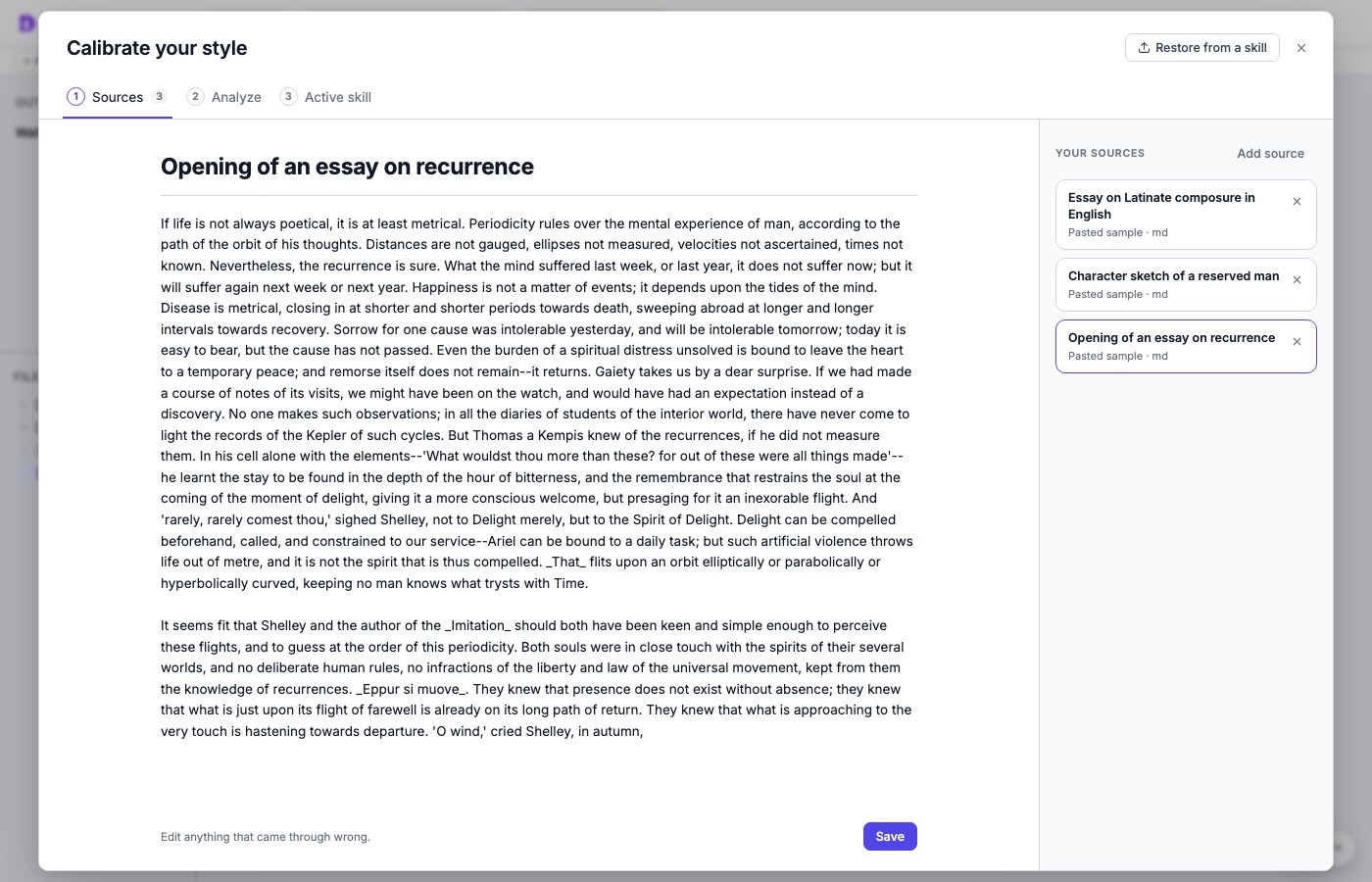
You add 3 to 5 passages from your writing. For each source:
* You paste a few hundred words. A sentence or two is not enough.
* You add a short description, such as "paper introduction" or "related work section".
* You select **Add source**.
 ## 2. Run the analysis
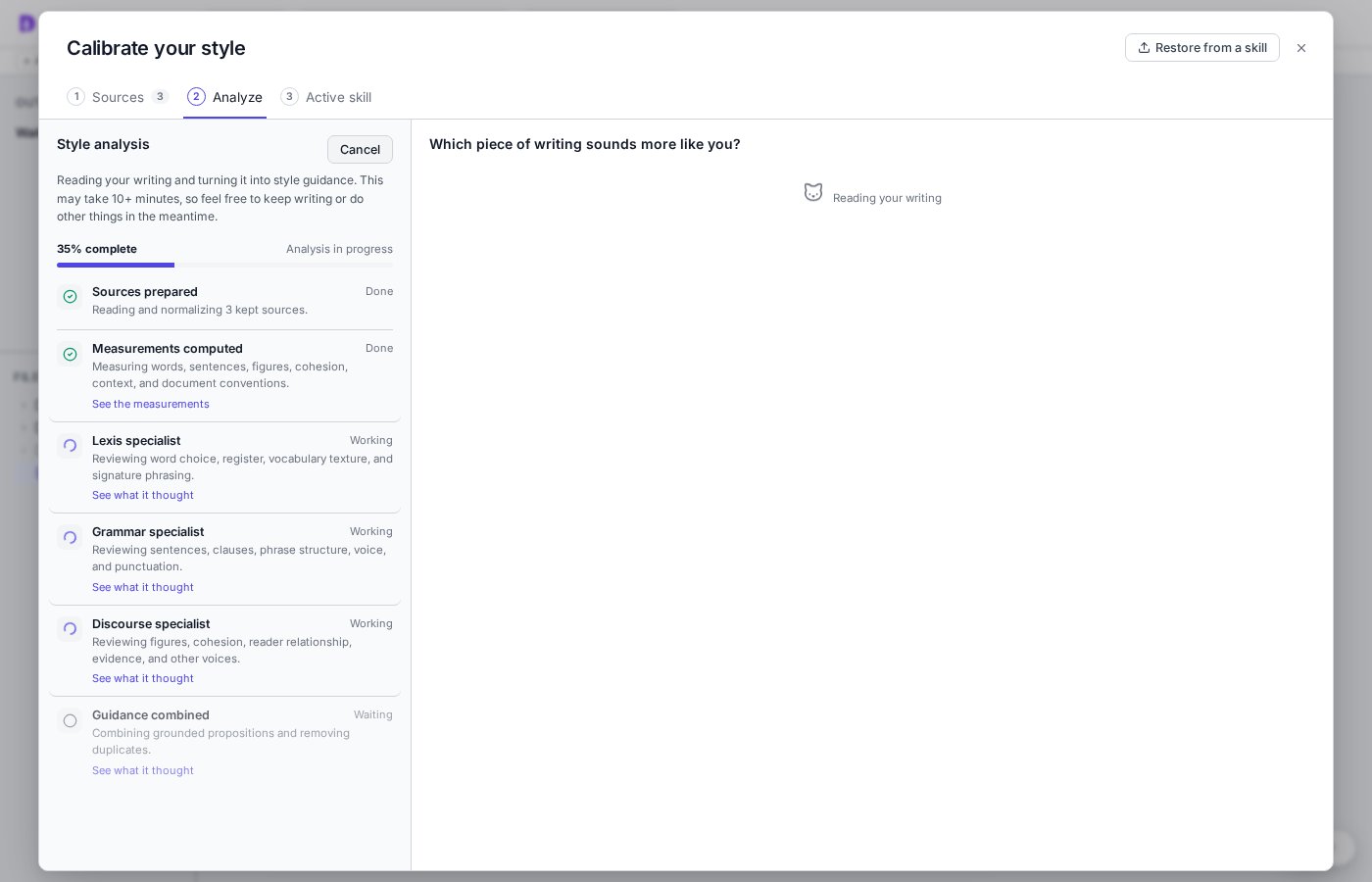
Then you select **Analyze** and **Run analysis**. DocWriter measures your passages and asks three specialist agents to study them. DocWriter combines their findings into instructions and uses the model you selected in the header.
The analysis usually takes about ten minutes. While it runs, you can close the dialog and keep writing. When you return, the left column shows what is done and what is still running. You can select any step to read its notes or measurements.
## 2. Run the analysis
Then you select **Analyze** and **Run analysis**. DocWriter measures your passages and asks three specialist agents to study them. DocWriter combines their findings into instructions and uses the model you selected in the header.
The analysis usually takes about ten minutes. While it runs, you can close the dialog and keep writing. When you return, the left column shows what is done and what is still running. You can select any step to read its notes or measurements.
 ## 3. Choose the version that sounds like you
While the analysis runs, you will see comparison cards. On each card, you compare a passage from your sources with a version that changes one writing choice. Then you choose one of these options:
* You choose **A** or **B** when one version sounds more like you.
* You choose **Both are the same to me** when you have no preference.
* You choose **Neither is good** when you want to edit one version.
* You choose **Skip proposition** when you do not want the agent to follow that choice.
## 3. Choose the version that sounds like you
While the analysis runs, you will see comparison cards. On each card, you compare a passage from your sources with a version that changes one writing choice. Then you choose one of these options:
* You choose **A** or **B** when one version sounds more like you.
* You choose **Both are the same to me** when you have no preference.
* You choose **Neither is good** when you want to edit one version.
* You choose **Skip proposition** when you do not want the agent to follow that choice.
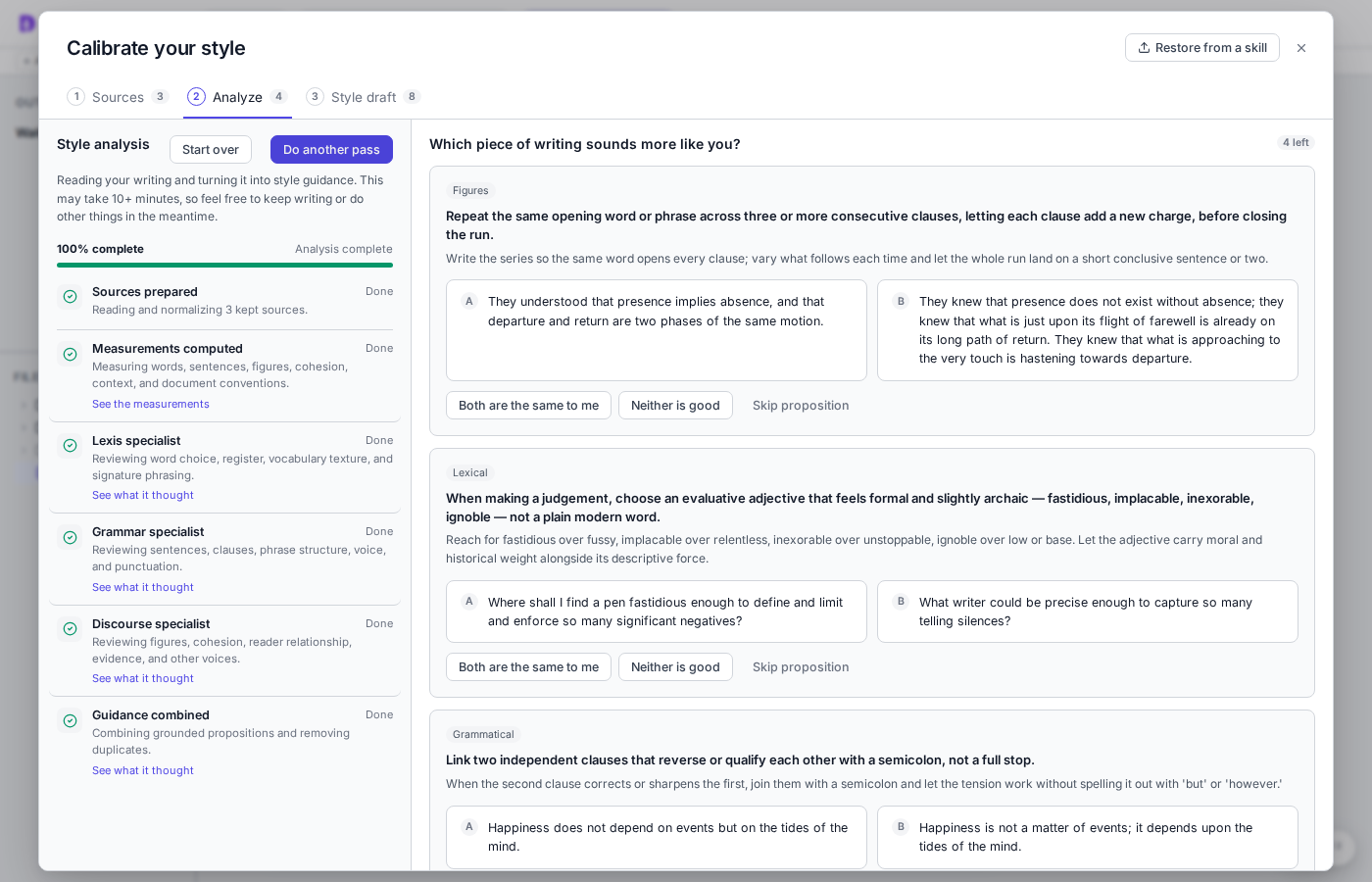 Keep answering the cards until none remain.
## 4. Review and save your style instructions
After you answer the cards, open **Style draft**. You review the instructions and remove any instruction you do not want. Then you select **Finalize style**. The writing agent keeps using your last finalized style until you finalize the new draft.
Keep answering the cards until none remain.
## 4. Review and save your style instructions
After you answer the cards, open **Style draft**. You review the instructions and remove any instruction you do not want. Then you select **Finalize style**. The writing agent keeps using your last finalized style until you finalize the new draft.
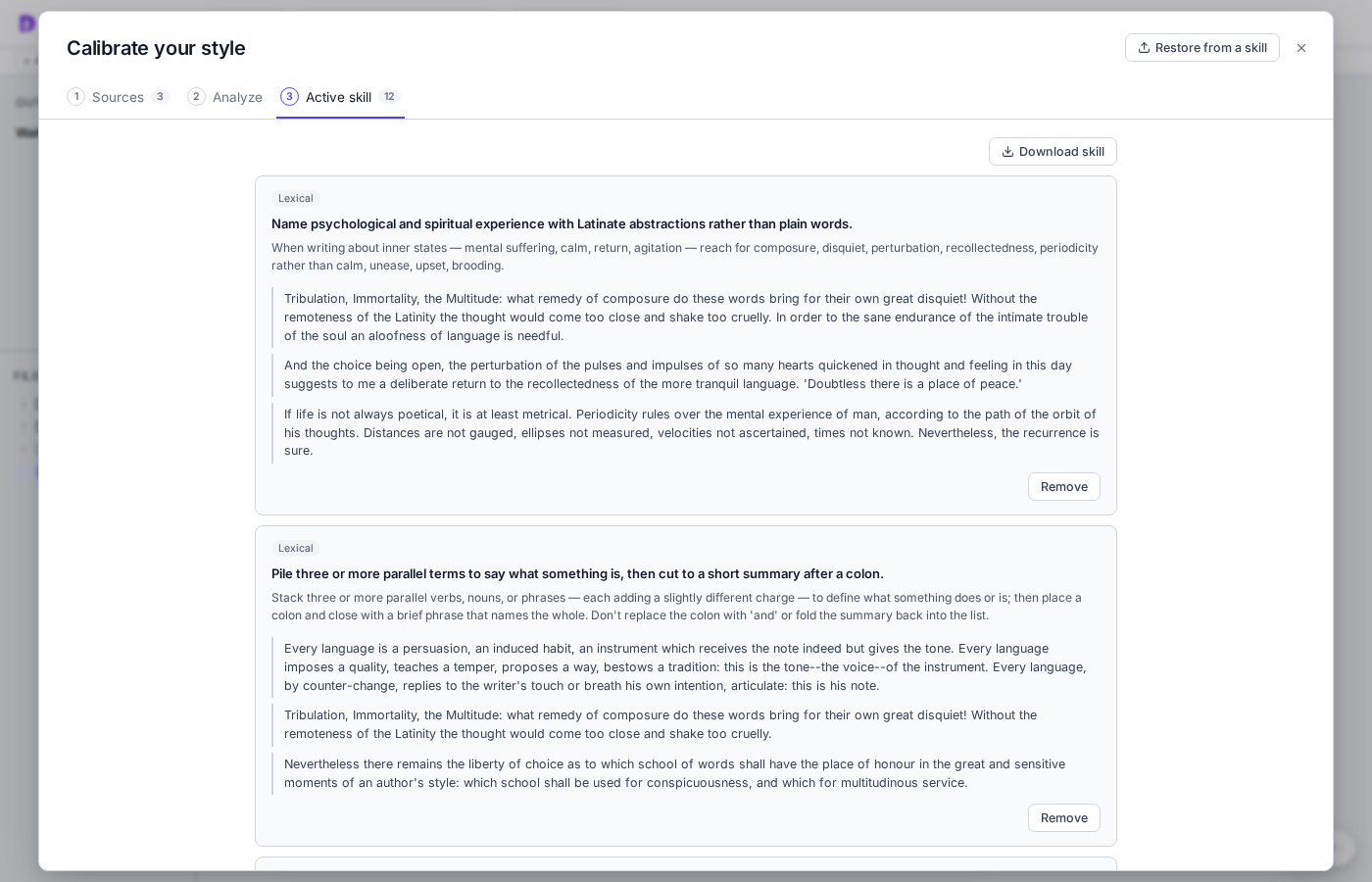 You can also download your style or restore an earlier version. If you want to discard the current analysis, return to **Analyze** and select **Start over**. Your sources and last finalized style will remain.
## 5. Use your style instructions
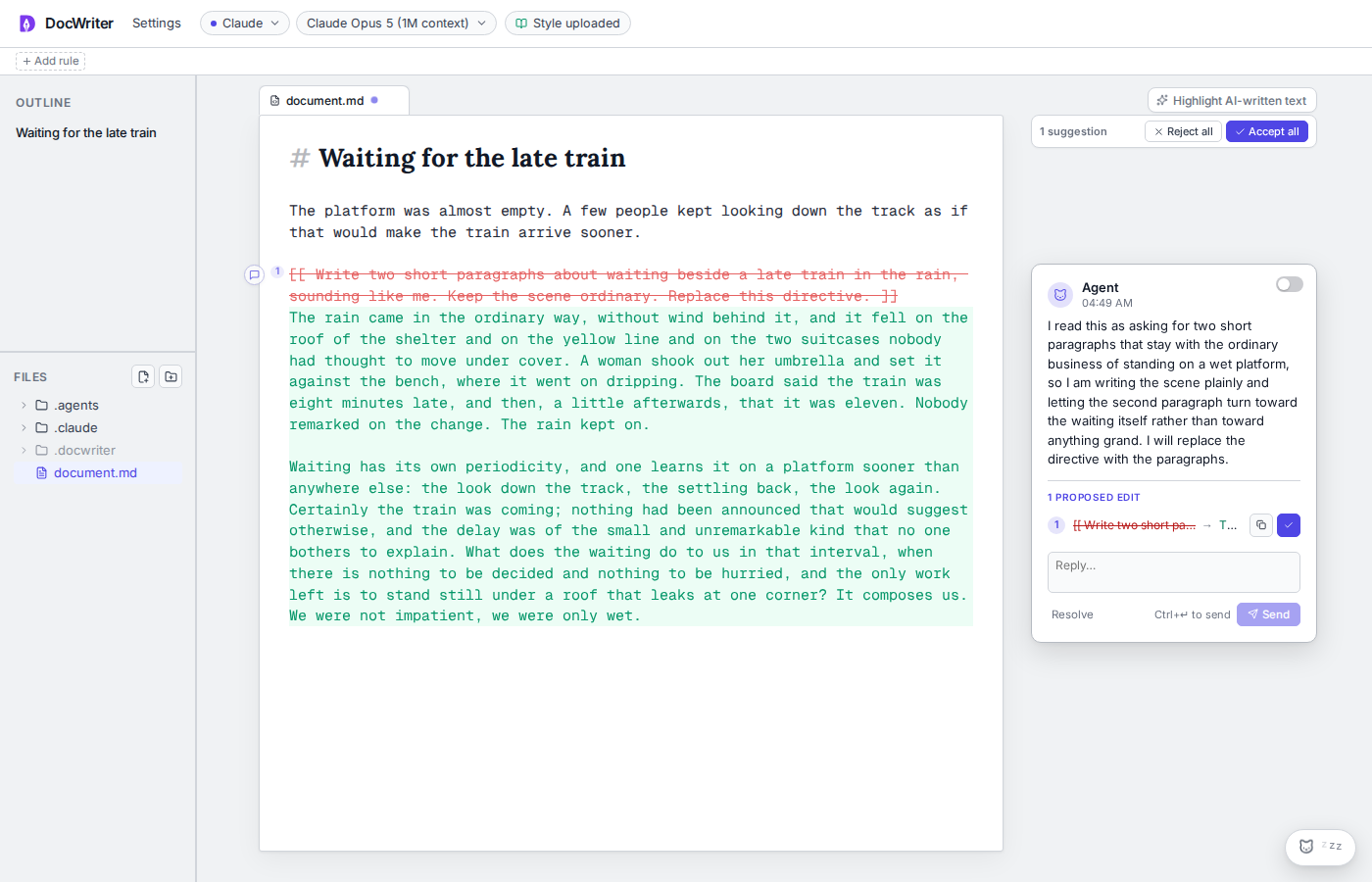
After you finalize your style, you can ask the writing agent to write or edit as usual. You can put your request in a directive inside the document:
```text theme={null}
[[ Write two short paragraphs about waiting beside a late train in the rain, sounding like me. Keep the scene ordinary. Replace this directive. ]]
```
You wake the agent, or wait for the idle timer. You will see the edit as a tracked change with an **Accept**, **Reject**, or **Retry** card. Open the card and review the full edit before you choose an action.
You can also download your style or restore an earlier version. If you want to discard the current analysis, return to **Analyze** and select **Start over**. Your sources and last finalized style will remain.
## 5. Use your style instructions
After you finalize your style, you can ask the writing agent to write or edit as usual. You can put your request in a directive inside the document:
```text theme={null}
[[ Write two short paragraphs about waiting beside a late train in the rain, sounding like me. Keep the scene ordinary. Replace this directive. ]]
```
You wake the agent, or wait for the idle timer. You will see the edit as a tracked change with an **Accept**, **Reject**, or **Retry** card. Open the card and review the full edit before you choose an action.
 ## How it works
We designed DocWriter’s style calibration feature around four properties:
1. **Specific to your writing.** The guidance should describe patterns in your writing, rather than generic advice about good writing.
2. **Important to you.** The guidance should include only the patterns you want the agent to preserve.
3. **Easy for you to confirm.** You should be able to make decisions without reviewing a long list of abstract claims.
4. **Portable across agents.** The guidance should work with writing agents outside DocWriter.
We discuss each property in turn.
**Specific to your writing.** We base the analysis on the linguistic checklist from Leech and Short’s [*Style in Fiction*](https://www.routledge.com/Style-in-Fiction-A-Linguistic-Introduction-to-English-Fictional-Prose/Short-Leech/p/book/9780582784093). The specialist agents examine words and short phrases, sentences and punctuation, and how ideas connect across a passage. They analyze headings, lists, and other layout choices separately. An agent proposes a pattern only when it can quote an example from your sources. We also discard measurements that provide no evidence. For example, a passage with no citations says nothing about how you use citations.
**Important to you.** We build on Shaikh et al.’s [*Creating General User Models from Computer Use*](https://arxiv.org/abs/2505.10831), where knowledge and preferences about a user are stored as structured propositions with confidence scores. We adapt the proposition format to writing and tie every proposition to quoted examples. A pattern found in your sources may not be one you want the agent to follow, so you confirm each proposition before it becomes part of your writing guidance.
**Easy for you to confirm.** The most direct way to confirm a proposition would be for DocWriter to show you the proposition and ask whether you agree. However, a long list of abstract claims is hard to evaluate, especially when you cannot see how each claim changes the writing. Instead, DocWriter shows you a passage from your sources next to a version where one proposed pattern has changed. You choose the version that sounds more like you. If neither version sounds right, you can edit one or skip the proposition.
**Portable across agents.** After you finish, the propositions you approved are packaged as an `author-style` skill under `.docwriter/skills/author-style/`. You can download the skill bundle and use it with other agents that load and use skills, to then follow the same guidance and examples.
## How it works
We designed DocWriter’s style calibration feature around four properties:
1. **Specific to your writing.** The guidance should describe patterns in your writing, rather than generic advice about good writing.
2. **Important to you.** The guidance should include only the patterns you want the agent to preserve.
3. **Easy for you to confirm.** You should be able to make decisions without reviewing a long list of abstract claims.
4. **Portable across agents.** The guidance should work with writing agents outside DocWriter.
We discuss each property in turn.
**Specific to your writing.** We base the analysis on the linguistic checklist from Leech and Short’s [*Style in Fiction*](https://www.routledge.com/Style-in-Fiction-A-Linguistic-Introduction-to-English-Fictional-Prose/Short-Leech/p/book/9780582784093). The specialist agents examine words and short phrases, sentences and punctuation, and how ideas connect across a passage. They analyze headings, lists, and other layout choices separately. An agent proposes a pattern only when it can quote an example from your sources. We also discard measurements that provide no evidence. For example, a passage with no citations says nothing about how you use citations.
**Important to you.** We build on Shaikh et al.’s [*Creating General User Models from Computer Use*](https://arxiv.org/abs/2505.10831), where knowledge and preferences about a user are stored as structured propositions with confidence scores. We adapt the proposition format to writing and tie every proposition to quoted examples. A pattern found in your sources may not be one you want the agent to follow, so you confirm each proposition before it becomes part of your writing guidance.
**Easy for you to confirm.** The most direct way to confirm a proposition would be for DocWriter to show you the proposition and ask whether you agree. However, a long list of abstract claims is hard to evaluate, especially when you cannot see how each claim changes the writing. Instead, DocWriter shows you a passage from your sources next to a version where one proposed pattern has changed. You choose the version that sounds more like you. If neither version sounds right, you can edit one or skip the proposition.
**Portable across agents.** After you finish, the propositions you approved are packaged as an `author-style` skill under `.docwriter/skills/author-style/`. You can download the skill bundle and use it with other agents that load and use skills, to then follow the same guidance and examples.