> ## Documentation Index
> Fetch the complete documentation index at: https://docs.docwriter.org/llms.txt
> Use this file to discover all available pages before exploring further.
# Writing a research-backed blog post
> Draft a post with gaps, leave [[ ... ]] notes for the agent to research, accept its findings inline.
This is the marquee end-to-end example. The pattern: draft what you
can, leave inline notes at the gaps, let the agent handle the gaps in
the background.
## 1. Make a workspace
```sh theme={null}
mkdir -p ~/writing/agentic-interfaces
cat > ~/writing/agentic-interfaces/blog-post.md <<'EOF'
# What we learned building agentic interfaces
A year of shipping AI-native developer tools surfaced a handful of
patterns that surprised us. Three of them are worth writing down.
## Latency dominates the perceived experience
User patience for AI tool response times is much lower than we
expected going in.
[[ Find a recent (2023-2025) study or write-up that measures user
tolerance for AI tool latency. Add a one-sentence summary inline with
a markdown footnote citation. ]]
## Async beats turn-based for creative work
The pattern that surprised us most: users prefer asynchronous AI
workflows when the task is creative rather than transactional.
[[ Verify: there is likely recent HCI research comparing turn-based
versus asynchronous human-AI collaboration interfaces. Search for it
and cite a relevant paper with a footnote if found. ]]
## Voice consistency is the hardest part
The default voice of any frontier model is not your voice.
EOF
```
You now have a draft with two directives. They mark spots where you
want the agent to do research and propose a citation.
## 2. Open the project
```sh theme={null}
docwriter --new-session ~/writing/agentic-interfaces
```
Open `blog-post.md` from the file tree.
![A blog post draft with two inline [[ ... ]] directives, before the agent has run](https://mintcdn.com/ucberkeley-8d9be701/pOA9wX63uxLFsbqp/images/blog-post-open.png?fit=max&auto=format&n=pOA9wX63uxLFsbqp&q=85&s=f0db317ffb0a85c8f82c671e14a317dc) The directives are visible inline. The outline pane on the left shows
the auto-generated table of contents.
## 3. Give the agent context
This step is optional but improves the output substantially. Under
**Settings**, then **Writing references**, paste in (or link to) a
sample of your own writing whose voice you want the agent to match. A
previous post, a paper introduction, anything that sounds like you.
Under **Settings**, then **Writing rules**, add any preferences:
* "Footnotes for citations, not parenthetical links."
* "Avoid passive voice."
* "Don't start sentences with `Furthermore` or `Moreover`."
## 4. Let the agent take a pass
Stop typing. Three seconds later, the agent auto-wakes, reads the
file, finds the directives, and starts working. It uses web search to
find candidate citations, picks the ones that fit, and proposes edits
that weave them into the prose.
The directives are visible inline. The outline pane on the left shows
the auto-generated table of contents.
## 3. Give the agent context
This step is optional but improves the output substantially. Under
**Settings**, then **Writing references**, paste in (or link to) a
sample of your own writing whose voice you want the agent to match. A
previous post, a paper introduction, anything that sounds like you.
Under **Settings**, then **Writing rules**, add any preferences:
* "Footnotes for citations, not parenthetical links."
* "Avoid passive voice."
* "Don't start sentences with `Furthermore` or `Moreover`."
## 4. Let the agent take a pass
Stop typing. Three seconds later, the agent auto-wakes, reads the
file, finds the directives, and starts working. It uses web search to
find candidate citations, picks the ones that fit, and proposes edits
that weave them into the prose.
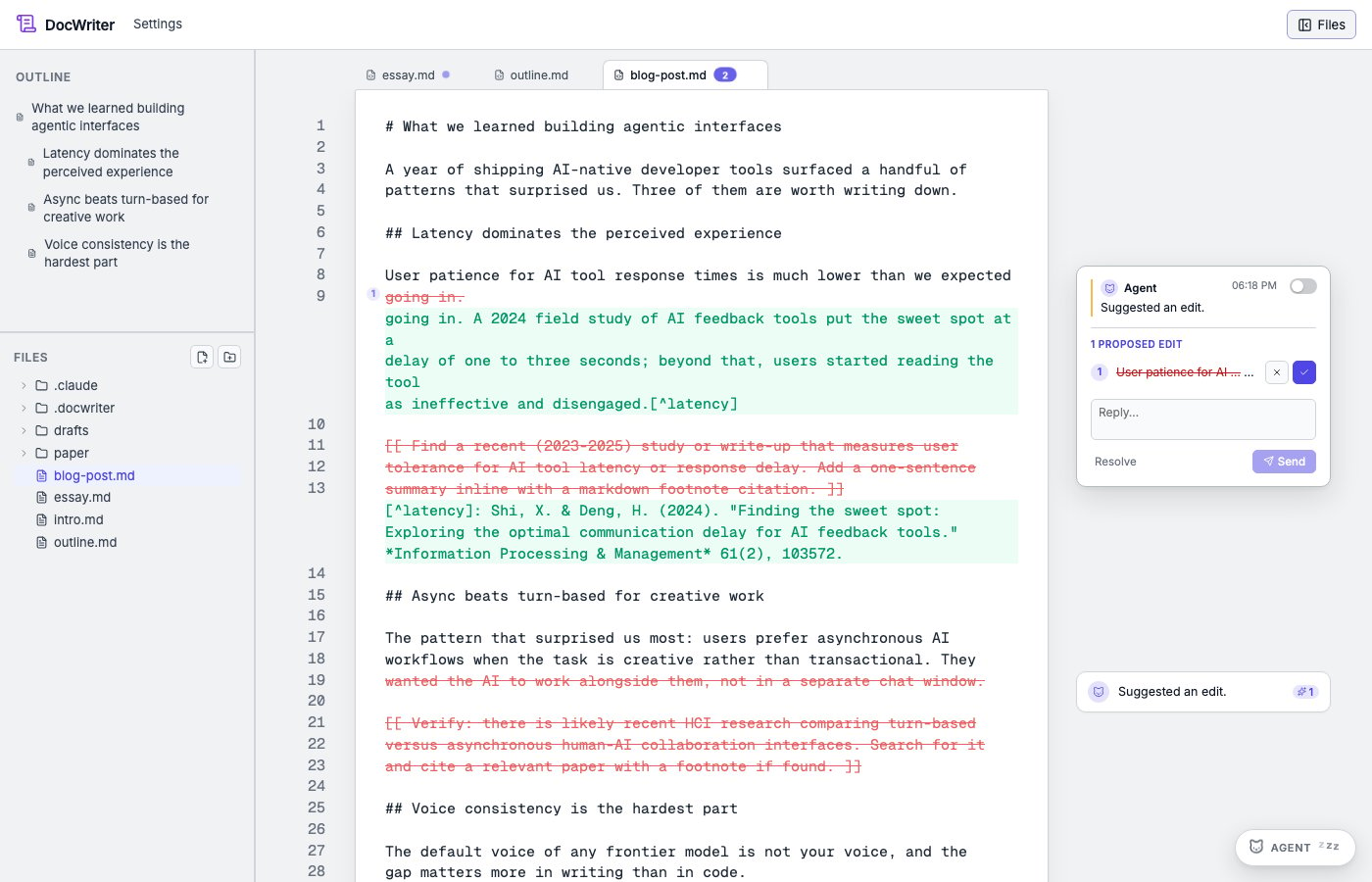 What's in the shot:
* The history pane on the right shows live tool calls: `WebSearch`
(twice), `edit_doc` (twice), `read_doc`. The agent is actually
searching the web.
* The editor shows track-changes for both directives. Each directive
line is struck through; a new sentence with a footnoted citation is
added in its place.
* The right pane shows two pending review cards, one per directive,
with the diff and Accept/Reject buttons.
## 5. Review
Click each pending review card to scroll the editor to its location.
Accept the ones you like; reject the rest. The agent's footnoted
citations are inserted at the bottom of the document with the URL it
found; you can sanity-check the source before publishing.
If a citation doesn't fit, click **Retry with feedback** on the card
and tell the agent what to look for instead ("nothing from before
2023", "needs a peer-reviewed source"). The agent reruns the same
directive with your feedback.
## 6. Optional: HTML preview
If you want a live HTML preview of the post for layout, links, and
images, add the pandoc HTML hook. Open **Settings**, click **Hooks**,
then click the **pandoc HTML** chip. The form fills in:
* Event: `PostToolUse`
* Matcher: `Edit|Write`
* Command: `pandoc {{file}} -o {{stem}}.html --standalone`
* Output: `{{stem}}.html`
Save. The next time you (or the agent) edit the post, the HTML
rebuilds; a **Preview** button appears top-right of the editor to open
a synced popup window. See [Hooks](/automation/hooks) and [Live
preview](/automation/preview).
## The loop
The workflow from here is just the writing loop, with directives as
the bridge to the agent:
1. Write.
2. Hit a spot you'd want to fact-check, cite, or rewrite later.
3. Drop a `[[ ... ]]` (or `(( ... ))` or `<< ... >>`).
4. Keep writing.
5. Every time you pause for three seconds, the agent picks up whatever
directives are queued and proposes edits.
6. Review, accept, retry, repeat.
The chat popover (top-right Send button) is for requests that don't
anchor to a specific spot in the doc, like "restructure these three
posts into one" or "find five papers on X and summarize them in
`research-notes.md`."
## Where to go next
* [Inline directives](/agent/inline-directives). The full reference.
* [Steering the agent](/agent/steering-the-agent). Autonomy levels,
model selection.
* [Editing an Overleaf LaTeX project](/guides/overleaf). The same loop
on a LaTeX manuscript, with PDF preview and git push back to
Overleaf.
What's in the shot:
* The history pane on the right shows live tool calls: `WebSearch`
(twice), `edit_doc` (twice), `read_doc`. The agent is actually
searching the web.
* The editor shows track-changes for both directives. Each directive
line is struck through; a new sentence with a footnoted citation is
added in its place.
* The right pane shows two pending review cards, one per directive,
with the diff and Accept/Reject buttons.
## 5. Review
Click each pending review card to scroll the editor to its location.
Accept the ones you like; reject the rest. The agent's footnoted
citations are inserted at the bottom of the document with the URL it
found; you can sanity-check the source before publishing.
If a citation doesn't fit, click **Retry with feedback** on the card
and tell the agent what to look for instead ("nothing from before
2023", "needs a peer-reviewed source"). The agent reruns the same
directive with your feedback.
## 6. Optional: HTML preview
If you want a live HTML preview of the post for layout, links, and
images, add the pandoc HTML hook. Open **Settings**, click **Hooks**,
then click the **pandoc HTML** chip. The form fills in:
* Event: `PostToolUse`
* Matcher: `Edit|Write`
* Command: `pandoc {{file}} -o {{stem}}.html --standalone`
* Output: `{{stem}}.html`
Save. The next time you (or the agent) edit the post, the HTML
rebuilds; a **Preview** button appears top-right of the editor to open
a synced popup window. See [Hooks](/automation/hooks) and [Live
preview](/automation/preview).
## The loop
The workflow from here is just the writing loop, with directives as
the bridge to the agent:
1. Write.
2. Hit a spot you'd want to fact-check, cite, or rewrite later.
3. Drop a `[[ ... ]]` (or `(( ... ))` or `<< ... >>`).
4. Keep writing.
5. Every time you pause for three seconds, the agent picks up whatever
directives are queued and proposes edits.
6. Review, accept, retry, repeat.
The chat popover (top-right Send button) is for requests that don't
anchor to a specific spot in the doc, like "restructure these three
posts into one" or "find five papers on X and summarize them in
`research-notes.md`."
## Where to go next
* [Inline directives](/agent/inline-directives). The full reference.
* [Steering the agent](/agent/steering-the-agent). Autonomy levels,
model selection.
* [Editing an Overleaf LaTeX project](/guides/overleaf). The same loop
on a LaTeX manuscript, with PDF preview and git push back to
Overleaf.